Monport 20W Fiber Laser Engraver vs xTool F1 Ultra 20W Fiber & Diode Dual Laser Engraver
Head-to-head spec comparison to help you pick the right fiber laser for your needs.
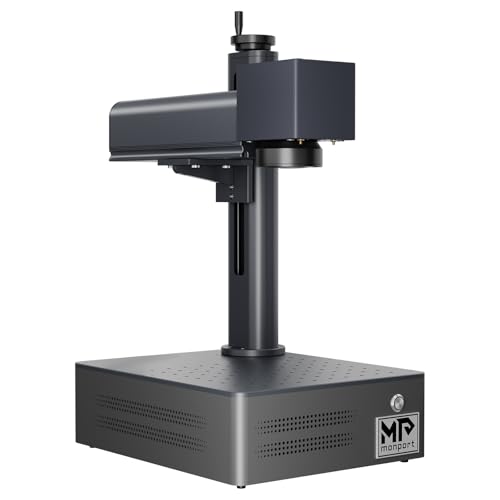
Monport
$1,299.99
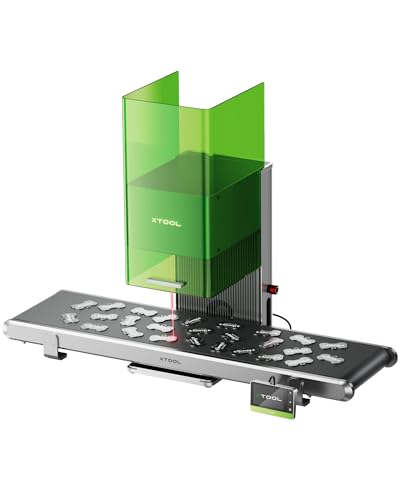
xTool
Unavailable
Spec-by-Spec Comparison
| Spec | Monport 20W Fiber Laser Engraver | xTool F1 Ultra 20W Fiber & Diode Dual Laser Engraver |
|---|---|---|
| Wattage | 20 W | 20 W |
| Laser Type | Q-Switched | Q-Switched |
| Laser Source | Raycus | Not disclosed |
| Work Area (W) | 110 mm | 220 mm |
| Work Area (H) | 110 mm | 220 mm |
| Galvo Speed | 7000 mm/s | 10000 mm/s |
| Color Marking | No | No |
| LightBurn | Yes | Yes |
| Autofocus | No | Yes |
| Weight | 3.2 kg | 14.7 kg |
| Software | BSLcad + LightBurn (galvo license required separately) | xTool Creative Space; basic LightBurn workflow supported |
| Pulse Width | N/A (Q-Switched) | N/A (Q-Switched) |
| Price | $1,299.99 | Unavailable |
| Rating | 6.5/10 | 8.6/10 |
| Buy on Amazon | Amazon offer unavailable (checked 2026-07-10) |
Pros & Cons
Monport 20W Fiber Laser Engraver
Pros
- The current Amazon title explicitly says LightBurn compatible and BSLcad included; confirm controller and license requirements with the seller
- Raycus 20W source marks stainless steel, aluminum, brass, titanium, copper, and anodized aluminum consistently — the same source family used in machines twice the price
- Q-switched monochrome marks are deep and durable — serial numbers, logos, and ID marks survive heavy daily use without fading or rubbing off
- 110×110mm work area covers rings, dog tags, knife blade sections, and metal business cards without repositioning
- 3.2kg form factor is genuinely portable — moves between bench and jobsite without fixed infrastructure or dedicated workspace
Cons
- LightBurn setup on the BSLFiber controller is poorly documented — LightBurn forum (Jan 2025) rated Monport's galvo setup instructions 'horrible'; expect troubleshooting before first successful job
- The catalog's 10,000mm/s speed claim trails GWEIKE's 15,000mm/s claim; neither title-only claim proves real-job throughput
- No color marking — Q-switched fixed pulse width cannot produce oxidation colors on stainless steel regardless of settings or software
- No autofocus — manual Z-axis height setup required for every material change or thickness variation; a friction point that dedicated color-marking workflows cannot absorb
- BSLcad community resources are nearly nonexistent — unlike GWEIKE or OMTech, no active forum threads, settings libraries, or YouTube tutorials specific to BSLcad workflows
xTool F1 Ultra 20W Fiber & Diode Dual Laser Engraver
Pros
- 20W fiber and 20W diode sources cover metal engraving alongside common wood, acrylic, leather, and other diode-compatible work
- A 220×220mm base work area and camera-led XCS workflow support positioning and repeatable batch layouts
- The enclosure can create xTool's documented Class-1 operating conditions when it is fully closed, the exhaust pipe remains installed, and the enclosure-stop control is enabled
- Autofocus, smart fill, and camera-assisted positioning reduce manual setup for compatible XCS workflows
- The optional conveyor and rotary accessories extend the machine beyond flat, single-piece jobs
Cons
- xTool does not identify the F1 Ultra as a MOPA model, so it is not the family choice for controlled pulse-width color work
- LightBurn supports a basic processing workflow but not the machine's complete feature set; xTool directs full-feature use to XCS
- Camera-led automation and signature batch features remain dependent on xTool Creative Space
- At 14.7 kg, it is a desktop machine rather than a lightweight event engraver
- The fiber-source manufacturer is not disclosed in xTool's current official documentation
Our Verdicts
Monport 20W Fiber Laser Engraver
The Monport 20W remains a basic metal-marking option for buyers prepared to self-support a thinly documented BSLcad and LightBurn setup. The verified Amazon offer was $1,299.99 with limited stock on July 10, 2026, not the historical $349 configuration described in older copy. At essentially the same verified price as the GWEIKE G2 20W, choose on software support, work area, and seller terms rather than an outdated budget claim.
xTool F1 Ultra 20W Fiber & Diode Dual Laser Engraver
The xTool F1 Ultra is a strong fit for buyers who need 20W fiber and 20W diode capability in one camera-guided desktop workflow. Its enclosure has conditional Class-1 operating conditions, not a blanket exemption from laser-safety controls, and its full automation remains XCS-dependent. It is not the MOPA choice for controlled pulse-width color work. The tracked Amazon offer remains out of stock, so Amazon buying exits and Offer structured data stay suppressed until a fresh eligible offer is verified.
xTool F1 Ultra 20W Fiber & Diode Dual Laser Engraver
No current Amazon offer